

How To Change Facebook's Default Theme To Any Color You Want
We are going to share an interesting trick on changing your Facebook default theme. You just need a Google Chrome extension to perform this trick. If you are among me who feels very fatigued with the look of Facebook's by default theme then this is a must-see post because you will find out the easiest trick to make your facebook more attractive than before.
acebook is a social networking site which empowers people to connect with friends and people around. That's how Facebook is habitually introduced. However, Facebook is beyond the need of being introduced as almost everyone is on it.
A couple of Days ago I was simply Surfing Google Chrome website and I somehow stumbled upon a Chrome Extension. Yes, a Chrome extension that will give your Facebook a Whole new look. I was apprehensive to try it, So I just installed it and checked my facebook. I was astonished to see my facebook homepage have all new look. I found it refreshing and decided to write steps on How to Change Facebook Themes using Chrome Extension.
How To Change Facebook's Default Theme To Any Color You Want
If You are among me who feels very fatigued with the look of Facebook's by default theme then this is a must-see post, Because you will find out the easiest trick to make your facebook more attractive than before. Simply follow the steps to know about it.
How to Change Facebook Theme Using Chrome Extension
Step 1. Install Stylish for Chrome from the Chrome Web Store. It will take hardly a minute to get installed in your Chrome browser.
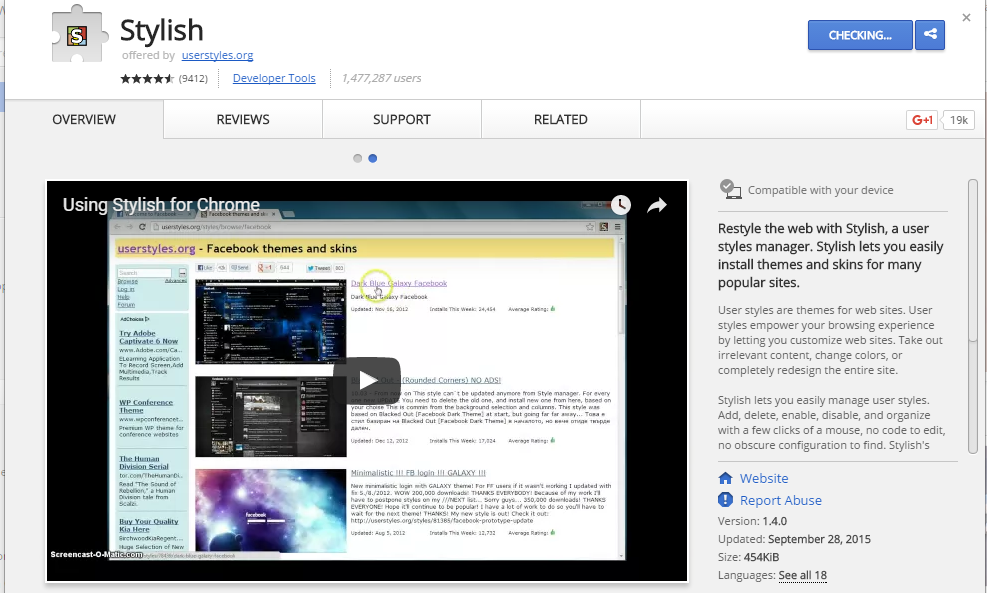
Change Facebook Theme Using Chrome Extension
Step 2. Navigate to Facebook.com and click on the S button. Click on Find Styles for this Site to open a new tab with free themes to use for Facebook. Most of the themes are free and attractive too you can easily browse over the full website to discover your favorite theme.
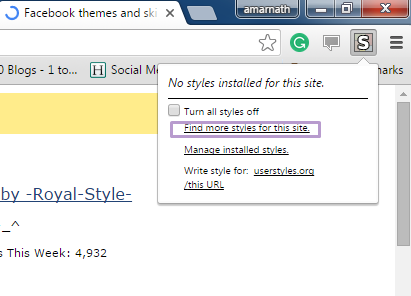
Change Facebook Theme Using Chrome Extension
Step 3. Now You will be redirected towards https://userstyles.org Guess what! This site contains huge numbers of Facebook themes, One thing is for sure that you will be confused in-between what to select and which one to skip. Select any them and click on it. Now you will be given a full preview of your selected theme.
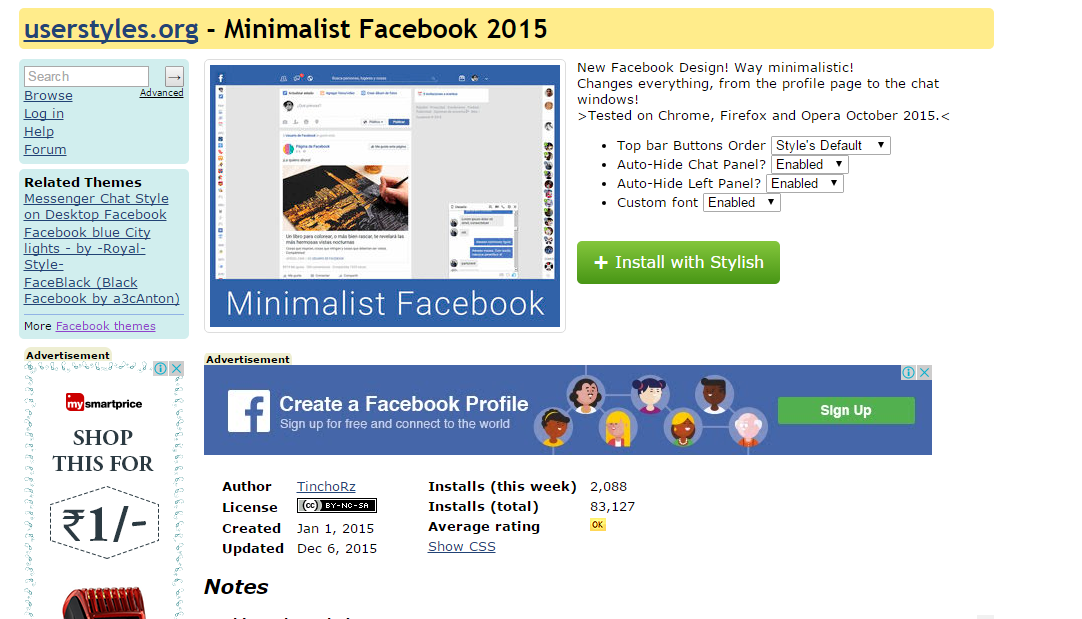
Change Facebook Theme Using Chrome Extension
Step 4. If everything is fine in the previewed theme, click on Install with Stylish button at the top right corner of the page. It will take few seconds or minutes depends on your theme size to be installed in Stylish Extension, once installed you will be notified with a success message.
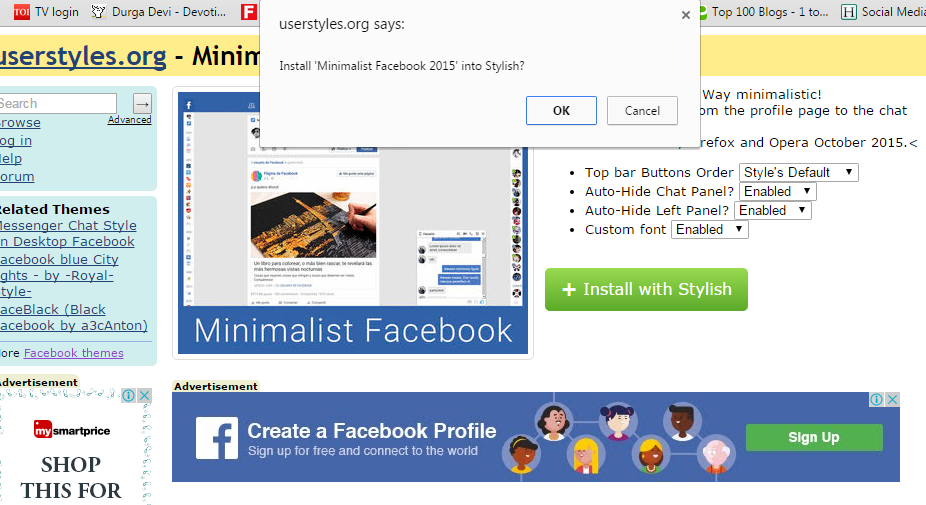
Change Facebook Theme Using Chrome Extension
Step 5. Now whenever you open Facebook, it will show the theme that you have installed with Stylish instead of the boring old blue theme.

Change Facebook Theme Using Chrome Extension
Related links
- Hackers Toolbox
- Hack And Tools
- Best Pentesting Tools 2018
- Pentest Tools Website
- Hacker Hardware Tools
- Hacking Tools For Games
- New Hacker Tools
- Hacker Hardware Tools
- Hacking Tools Software
- Underground Hacker Sites
- Hacker Tools Windows
- Bluetooth Hacking Tools Kali
- Hacker Tools For Ios
- Hacker Tools Software
- Hacker Tools Mac
- Pentest Recon Tools
- Hack Tool Apk No Root
- Hacker Tools Linux
- Hack Tools
- Hacking Tools Download
- Hacker Tools Free Download
- Bluetooth Hacking Tools Kali
- Pentest Tools Open Source
- Hacking Tools 2020
- Bluetooth Hacking Tools Kali
- Hack Tools
- Hacking Tools For Beginners
- Hacking Tools Kit
- Hack App
- Hack Tools Online
- What Is Hacking Tools
- Hacker Tools Free
- Hack Tools For Windows
- Termux Hacking Tools 2019
- Hacking Tools Software
- Github Hacking Tools
- Ethical Hacker Tools
- Pentest Tools Open Source
- Hacking Tools Pc
- Pentest Tools Find Subdomains
- Hacking Tools And Software
- Bluetooth Hacking Tools Kali
- Pentest Tools Alternative
- Hacker Tools Linux
- Hacker Tools Github
- Pentest Tools Online
- Hacking Tools 2019
- Hacker Tools List
- Bluetooth Hacking Tools Kali
- Physical Pentest Tools
- Hack Tools Online
- Hacker Tools 2019
- Hack App
- Hacking Tools Hardware
- Tools Used For Hacking
- Hacker Tools
- Hacking Apps
- Pentest Recon Tools
- Hacker Tools
- Pentest Tools Url Fuzzer
- What Are Hacking Tools
- Hacking Tools Name
- Hack Tools For Mac
- Tools 4 Hack
- Hack Tools Mac
- Hacking App
- Hacking Tools For Windows 7
- Pentest Tools Website
- World No 1 Hacker Software
- What Is Hacking Tools
- Kik Hack Tools
- Pentest Tools Website
- Hacker Tools Windows
- Computer Hacker
- Pentest Automation Tools
- Hacking Tools Mac
- Hack App
- Best Hacking Tools 2019
- Hacks And Tools
- Pentest Tools
- Pentest Tools Nmap
- Hack Tools For Ubuntu
- Hack Tools
- Hacking Tools Software
- Hack Tools Download
- How To Hack
- Hacker Tools List
- Hacker Tools 2019
- Hacking Tools For Pc
- Pentest Recon Tools
- Hacker Tools For Pc
- Physical Pentest Tools
- Pentest Tools Framework
- Pentest Tools Website Vulnerability
- Hacking Tools For Beginners
- Pentest Tools For Mac
- Hacker Techniques Tools And Incident Handling
- Hacker Tools For Mac
- Hacking Tools Software
- Ethical Hacker Tools
- What Are Hacking Tools
- Pentest Tools For Android
- Hack Tools 2019
- Hacker Tools Linux
- Hacking Tools Usb
- Github Hacking Tools
- What Are Hacking Tools
- Hack Tools Download
- Hack Tools For Ubuntu
- Hack Apps
- Hacking Tools For Beginners
- Hacking Tools For Beginners
- Kik Hack Tools
- Pentest Tools Alternative
- Hacking Tools For Mac
- Hack Tools For Ubuntu
- Hacking Tools For Windows 7
- Free Pentest Tools For Windows
- World No 1 Hacker Software
- Pentest Tools List
- Hacker Tools Mac
- Hacking Tools For Pc
- Hacker
- Hacker Tools Software
- Hack Rom Tools
- Hacker Tools 2019
- Hacking Tools And Software
- Hacking Tools For Mac
- Hacker Tools For Mac
- Pentest Tools Linux
- Hack Tool Apk No Root
- Hackers Toolbox



No comments:
Post a Comment